# Refer Answer to Table Column

In **Row Labeling** projects, you can accelerate the annotation process by pre-filling answers based on the data present in your uploaded file (CSV, Excel, etc.).

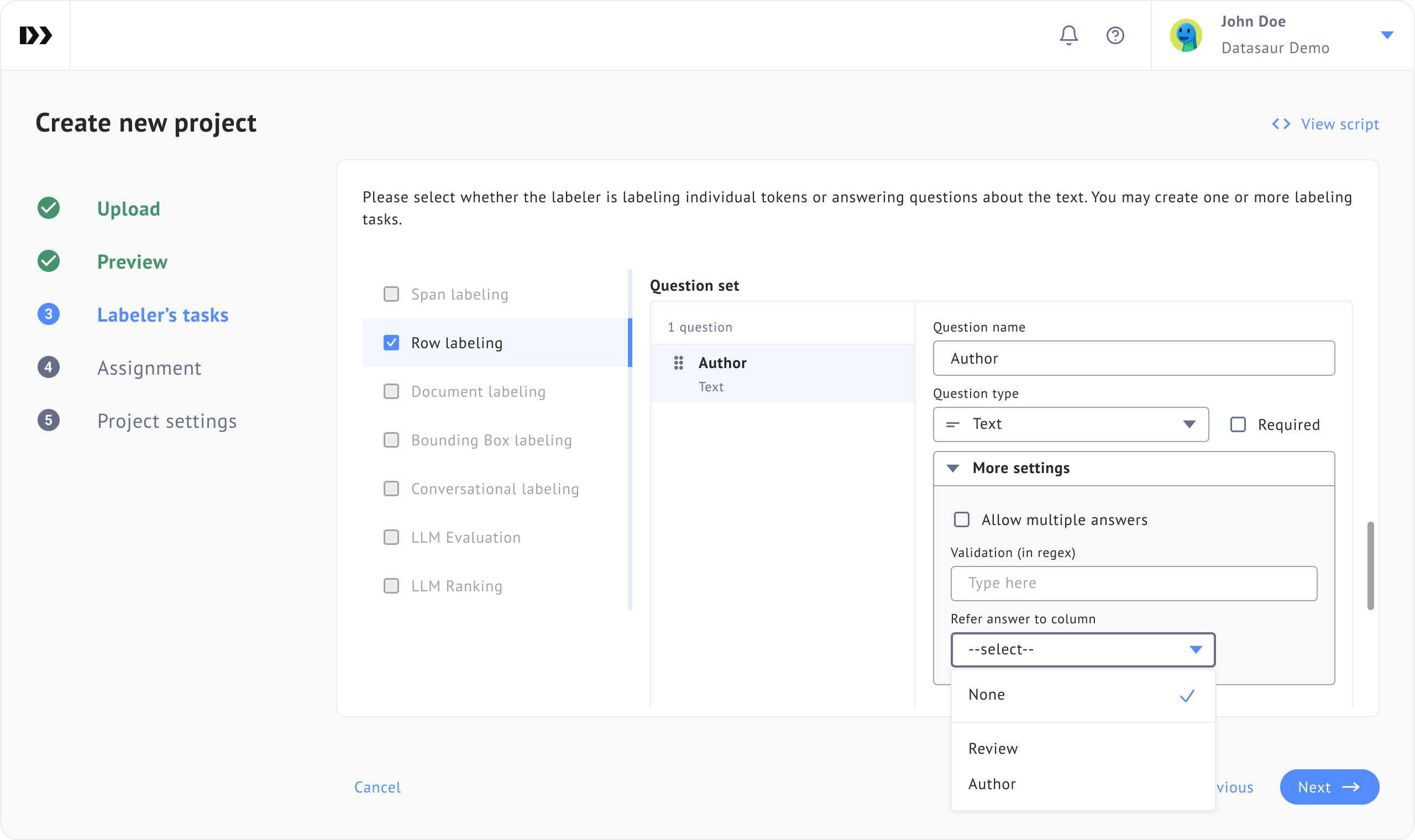
You can achieve this by configuring ‘**Refer answer to table column’** for each question and mapping it to a specific column header in your dataset. Once set, the system automatically creates pre-labeled answers based on the values in that column.

To configure this, navigate to Step 3 of the Project Creation Wizard. While adding or editing questions, open the **Advanced Settings** section, then choose the column header you want the question to refer to.

<figure><img src="https://448889121-files.gitbook.io/~/files/v0/b/gitbook-x-prod.appspot.com/o/spaces%2F-MbjY0HseEqu7LtYAt4d%2Fuploads%2Fgit-blob-24ab9c162aa0c27fffe287721c410099aaa816b4%2FPCW%20-%20step%203%20-%20Refer%20answers%20to%20column.png?alt=media" alt=""><figcaption></figcaption></figure>

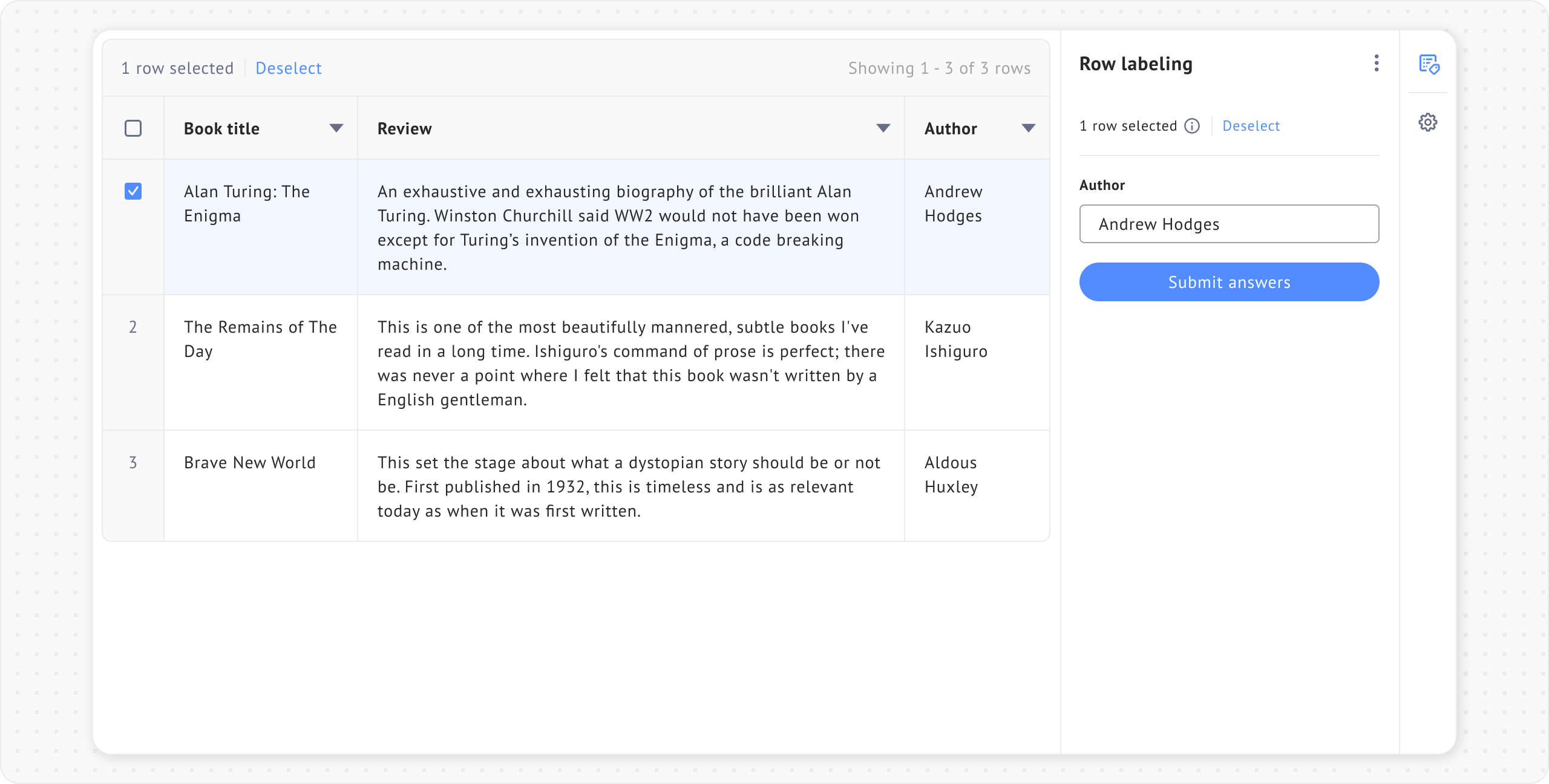
After completing the setup, open the project. You will see that the question has been pre-filled with answers parsed directly from the referenced column.

<figure><img src="https://448889121-files.gitbook.io/~/files/v0/b/gitbook-x-prod.appspot.com/o/spaces%2F-MbjY0HseEqu7LtYAt4d%2Fuploads%2Fgit-blob-8db75f1b5e72b7fb06d6d58c87a45a612f12d183%2FProject%20-%20row%20labeling%20-%201%20row%20selected%20-%20row%20labeling%20extension%20-%20refer%20answer%20to%20table%20column.png?alt=media" alt=""><figcaption></figcaption></figure>

## **Configuring for nested questions**

Datasaur also supports Refer answer to table column for nested questions, which are child questions under a [Grouped attributes](https://docs.datasaur.ai/data-studio-projects/lets-get-labeling/label-sets/..#id-12.-grouped-attributes) question. The parent Grouped attributes question cannot refer to a column directly, so the reference must be set on its child question(s) instead.

You can configure this using the same steps as regular flat-structured questions, as described in the previous section.

The parsing behavior may differ depending on whether the parent or child questions allow multiple answers, since nested questions may need to split values into multiple groups, multiple items, or both. The next section explains how this parsing works.

## Data parsing and separators

To maximize the utility of pre-labeling, specific characters in your tabular data are parsed to determine how answers should be split and grouped.

### **Multiple answers separator (**<mark style="color:red;">`;`</mark>**)**

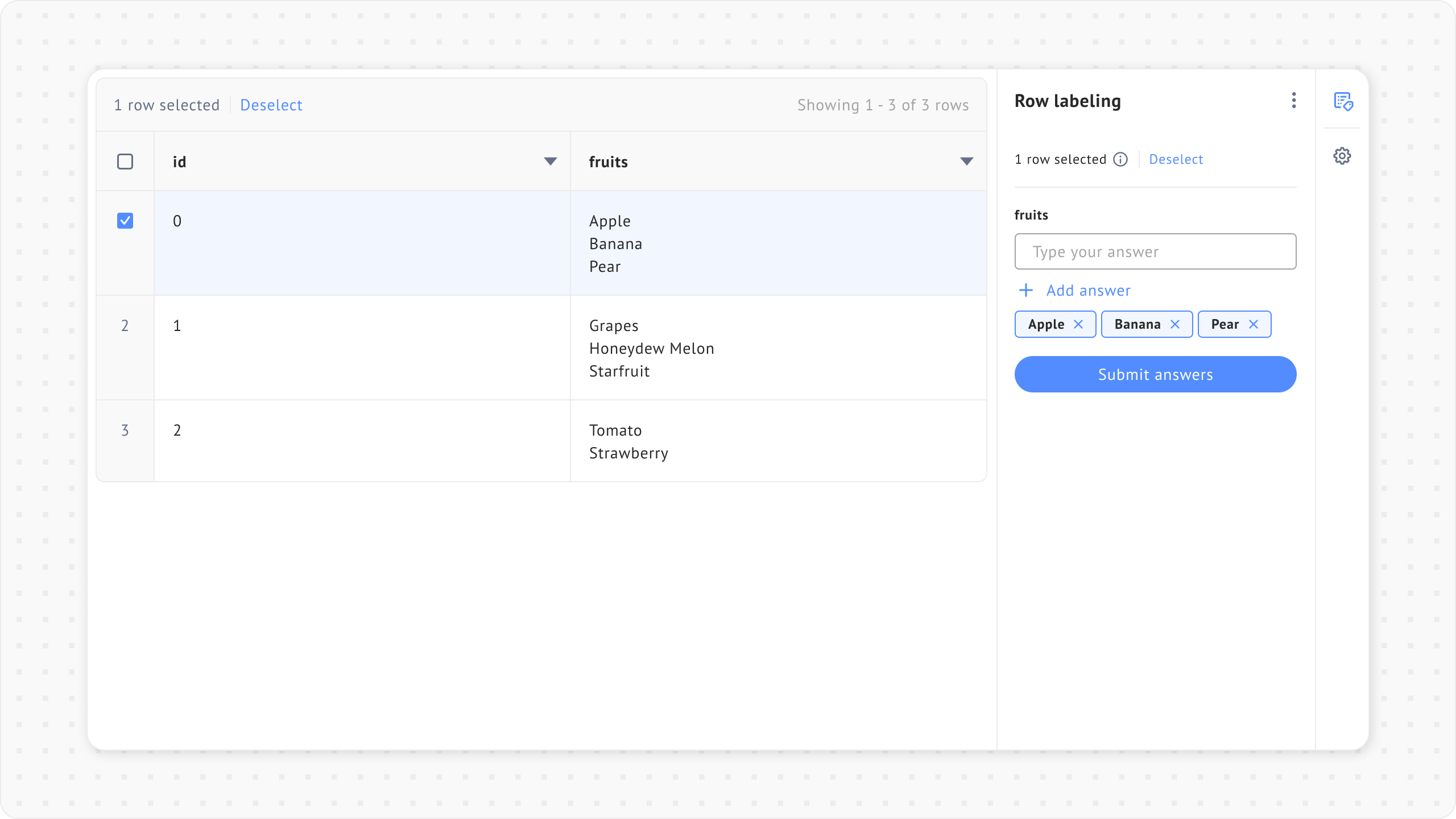
If a question is configured to **allow multiple answers**, you can use a semicolon <mark style="color:red;">`;`</mark> to split the data in a single cell into separate answers.

If the question **does not** allow multiple answers, the semicolon will be ignored, and the entire cell value will be treated as a single pre-labeled answer.

**Example**

* **Question:** "Fruit" (Type: Text)
* **Referred column cell data:** <mark style="color:red;">`Apple;Banana;Pear`</mark>
* **Result:** The system creates three pre-labeled answers: **Apple**, **Banana**, and **Pear**.

{% file src="<https://448889121-files.gitbook.io/~/files/v0/b/gitbook-x-prod.appspot.com/o/spaces%2F-MbjY0HseEqu7LtYAt4d%2Fuploads%2Fgit-blob-c093488740826aa6ee1ab4ceaefcf62411d2d1cc%2FDatasaur%20sample%20-%20Multiple%20answers%20separator.csv?alt=media>" %}

<figure><img src="https://448889121-files.gitbook.io/~/files/v0/b/gitbook-x-prod.appspot.com/o/spaces%2F-MbjY0HseEqu7LtYAt4d%2Fuploads%2Fgit-blob-563113e7bfc7b538c0ef0a1fd2635a59be92d37b%2FPCW%20-%20step%202%20-%20Multiple%20answers%20separator%20(%3B).png?alt=media" alt=""><figcaption></figcaption></figure>

<figure><img src="https://448889121-files.gitbook.io/~/files/v0/b/gitbook-x-prod.appspot.com/o/spaces%2F-MbjY0HseEqu7LtYAt4d%2Fuploads%2Fgit-blob-201d6820d904700d5bcc27852de45664a64c79f3%2FPCW%20-%20step%203%20-%20Multiple%20answers%20separator%20(%3B)%20-%20%20refer%20answer%20to%20column.png?alt=media" alt=""><figcaption></figcaption></figure>

<figure><img src="https://448889121-files.gitbook.io/~/files/v0/b/gitbook-x-prod.appspot.com/o/spaces%2F-MbjY0HseEqu7LtYAt4d%2Fuploads%2Fgit-blob-b1aedea2769398c37ac4fe00b6bde215895779a9%2FProject%20-%20row%20labeling%20-%201%20row%20selected%20-%20row%20labeling%20extension%20-%20multiple%20answers.png?alt=media" alt=""><figcaption></figcaption></figure>

### **Answer group separator (**<mark style="color:red;">`|||`</mark>**)**

{% hint style="info" %}
This separator is exclusive to **nested questions in Grouped attributes** question.
{% endhint %}

The <mark style="color:red;">`|||`</mark> separator controls how values from a single cell are split into **multiple answer groups**. Because it is used to create groups, it only takes effect when the **parent** Grouped Attributes question is configured to **allow multiple answers**.

To create multiple answer groups from a single cell, insert the triple pipe <mark style="color:red;">`|||`</mark> between groups. This separator can also be used alongside the multiple answers separator (<mark style="color:red;">`;`</mark>) within each group.

**Requirements for group parsing**

1. The **Grouped attributes (parent)** question must be configured to **allow multiple answers**.
   * Otherwise, the system ignores all <mark style="color:red;">`|||`</mark> separators and treats the cell as a single group.
2. The **nested question (child)** must refer to the column that contains the separators.
   * The child question may optionally **allow multiple answers,** enabling the parsing of the semicolon (<mark style="color:red;">`;`</mark>) within each group.

The following view outlines how the system parses data depending on how your nested questions are configured:

* **Case 1**

  <figure><img src="https://448889121-files.gitbook.io/~/files/v0/b/gitbook-x-prod.appspot.com/o/spaces%2F-MbjY0HseEqu7LtYAt4d%2Fuploads%2Fgit-blob-693a2f55e0ee690215269739dd38a26183973911%2FQuestion%20set%20-%20question%20type%20-%20Grouped%20answers%201.png?alt=media" alt=""><figcaption></figcaption></figure>

  * **Parent question:** Allow multiple answers → Unchecked :x:
  * **Nested question:** Allow multiple answers → Checked :white\_check\_mark:
  * **Column data:** <mark style="color:red;">`A1;A2|||B1;B2`</mark>
  * **The resulting pre-labeled answer:**
    * Group 1: <mark style="color:red;">`A1`</mark>, <mark style="color:red;">`A2|||B1`</mark>, <mark style="color:red;">`B2`</mark>
* **Case 2**

  <figure><img src="https://448889121-files.gitbook.io/~/files/v0/b/gitbook-x-prod.appspot.com/o/spaces%2F-MbjY0HseEqu7LtYAt4d%2Fuploads%2Fgit-blob-92f58edd6f723abdc3d9c19875fff33cfc658785%2FQuestion%20set%20-%20question%20type%20-%20Grouped%20answers%202.png?alt=media" alt=""><figcaption></figcaption></figure>

  * **Parent question:** Allow multiple answers → Checked :white\_check\_mark:
  * **Nested question:** Allow multiple answers → Unchecked :x:
  * **Column data:** <mark style="color:red;">`A1;A2|||B1;B2`</mark>
  * **The resulting pre-labeled answer:**
    * Group 1: <mark style="color:red;">`A1;A2`</mark>
    * Group 2: <mark style="color:red;">`B1;B2`</mark>
* Case 3

  <figure><img src="https://448889121-files.gitbook.io/~/files/v0/b/gitbook-x-prod.appspot.com/o/spaces%2F-MbjY0HseEqu7LtYAt4d%2Fuploads%2Fgit-blob-24d24b3b66922f606356c703f0b38a535f64b642%2FQuestion%20set%20-%20question%20type%20-%20Grouped%20answers%203.png?alt=media" alt=""><figcaption></figcaption></figure>

  * **Parent question:** Allow multiple answers → Checked :white\_check\_mark:
  * **Nested question:** Allow multiple answers → Checked :white\_check\_mark:
  * **Column data:** <mark style="color:red;">`A1;A2|||B1;B2`</mark>
  * **The resulting pre-labeled answer:**
    * Group 1: <mark style="color:red;">`A1, A2`</mark>\
      Group 2: <mark style="color:red;">`B1, B2`</mark>

## Test data example

1. Upload the file below during project setup:

{% file src="<https://448889121-files.gitbook.io/~/files/v0/b/gitbook-x-prod.appspot.com/o/spaces%2F-MbjY0HseEqu7LtYAt4d%2Fuploads%2Fgit-blob-dbb54bf72a04202308404569a3e33fbd71cefc89%2FDatasaur%20sample%20-%20Refer%20answer%20to%20column.csv?alt=media>" %}

2. In the Preview step of the Project Creation Wizard, make sure to enable **Convert first row as header**.

![](https://448889121-files.gitbook.io/~/files/v0/b/gitbook-x-prod.appspot.com/o/spaces%2F-MbjY0HseEqu7LtYAt4d%2Fuploads%2Fgit-blob-265e04f61633617a3c4d80ba0970b71760534282%2FPCW%20-%20step%202%20-%20Test%20data%20example%20-%203%20columns.png?alt=media)

3. In the Labelers’ tasks step, configure the questions as follows:
   * **Question 1:** <mark style="color:red;">`Colors`</mark> (Type: Text)
     * Enable **Allow multiple answers**
     * Set **Refer to column:&#x20;**<mark style="color:red;">**`colors_available`**</mark>

       ![](https://448889121-files.gitbook.io/~/files/v0/b/gitbook-x-prod.appspot.com/o/spaces%2F-MbjY0HseEqu7LtYAt4d%2Fuploads%2Fgit-blob-792a09ebae515cb9b61c087a7dd41d90a6dd9e80%2FPCW%20-%20step%203%20-%20row%20labeling%20-%20text%20field%20-%20refer%20answer%20to%20column.png?alt=media)
   * **Question 2:** <mark style="color:red;">`Vehicle parts`</mark> (Type: Grouped attributes)
     * Enable **Allow multiple answers**

       * **Question 2.1:** <mark style="color:red;">`Part name`</mark> (Type: Text)
         * Enable **Allow multiple answers**
         * Set **Refer to column:&#x20;**<mark style="color:red;">**`part_names_and_tags`**</mark>

       ![](https://448889121-files.gitbook.io/~/files/v0/b/gitbook-x-prod.appspot.com/o/spaces%2F-MbjY0HseEqu7LtYAt4d%2Fuploads%2Fgit-blob-238ae48c324e8634979d0be65345429252a762bd%2FPCW%20-%20step%203%20-%20row%20labeling%20-%20grouped%20attributes%20-%20text%20field%20-%20refer%20answer%20to%20column.png?alt=media)

### **Result**

After the project is created, labelers will see the questions automatically pre-filled according to the values in the CSV file.

![](https://448889121-files.gitbook.io/~/files/v0/b/gitbook-x-prod.appspot.com/o/spaces%2F-MbjY0HseEqu7LtYAt4d%2Fuploads%2Fgit-blob-9a227014fd65c4592e01ec2f37eebb456d7d38cc%2FExtension%20-%20row%20labeling%20-%20grouped%20attributes.png?alt=media)